The home office journal / Practical decisions
Logitech K400 Plus Wireless Touch Keyboard Buying Guide
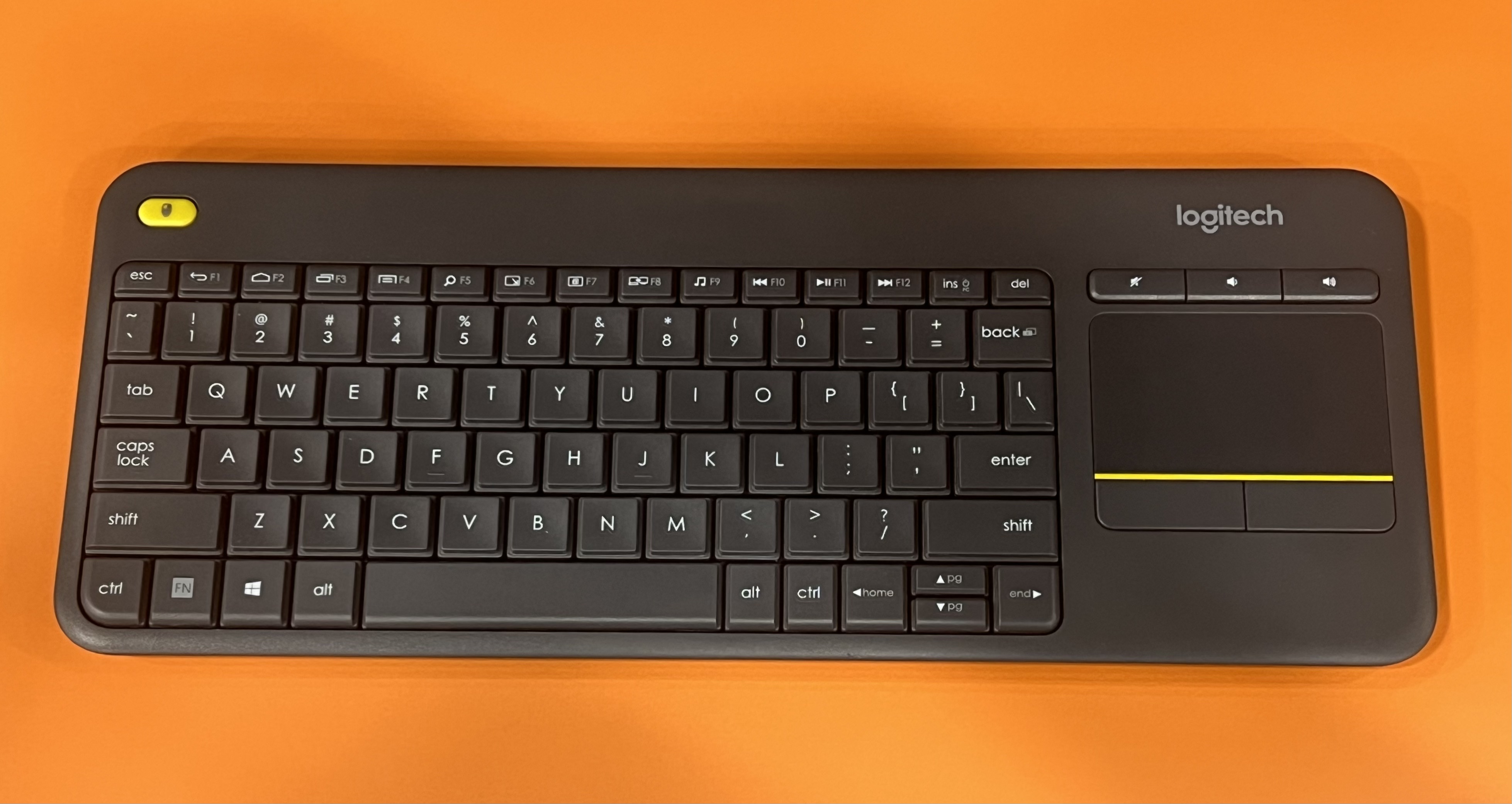
The Logitech K400 Plus is a compact wireless keyboard featuring an integrated touchpad designed to control a connected PC. It connects via a USB Unifying receiver, supports US English ANSI layout, and is compatible with Windows, Android, and Chrome OS. This guide covers its key features and compatibility based on official manufacturer information and exact-product validation sources.
By Office Home Supply editorial · Updated 2026-10-11 · 3 minute read
The Logitech K400 Plus Wireless Touch Keyboard is designed to provide a compact input solution with an integrated touchpad, simplifying control over a connected PC without the need for a separate mouse. Its compact form factor makes it suitable for environments where desk space or portability is a consideration. According to Logitech's official product description, this keyboard includes a US English ANSI layout combined with a built-in touchpad, allowing users to type and navigate more seamlessly in a single device setup (Source: https://www.logitech.com/en-us/products/keyboards/k400-plus-touchpad-keyboard.920-007119.html).
Connectivity is managed through Logitech's USB Unifying receiver, a small USB dongle that pairs multiple supported devices to one receiver. This feature simplifies setup and reduces the number of USB ports occupied on the connected computer. The receiver's inclusion means the keyboard interfaces wirelessly but requires an available USB port for connection, which is important for buyers to consider if their device has limited USB availability or relies heavily on Bluetooth instead (Source: https://www.logitech.com/en-us/products/keyboards/k400-plus-touchpad-keyboard.920-007119.html).
Battery life is a noted feature with the K400 Plus; Logitech claims up to 18 months of usage on the included batteries. This extended battery life can reduce maintenance frequency, making it practical for use in settings such as living rooms, classrooms, or offices where regular battery changes could be inconvenient. However, the actual battery longevity may vary depending on usage patterns and environmental factors, as manufacturer claims do not always reflect real-world performance (Source: https://www.logitech.com/en-us/products/keyboards/k400-plus-touchpad-keyboard.920-007119.html).
Compatibility spans several operating systems, explicitly supporting Windows 7 or later versions, Android 7 or later, and Chrome OS. This wide compatibility offers flexibility for users with devices running these platforms, ensuring that the keyboard will function with a variety of PCs and smart devices. Notably, Bluetooth is not mentioned, confirming reliance on the USB Unifying receiver for wireless connectivity, which users should consider if their access to USB ports is limited (Source: https://www.logitech.com/en-us/products/keyboards/k400-plus-touchpad-keyboard.920-007119.html).
Additional evidence confirms exact model identity with reliable source validation. A public school check register from November 2024 explicitly associates the B014EUQOGK ASIN with the Logitech K400 Plus Wireless Touch Keyboard, reaffirming the product model and variant as the black version with US English ANSI key legends. This verification is supported by the licensed product photograph and retailer metadata, affirming consistency in the product’s identification across sources (Source: https://core-docs.s3.us-east-1.amazonaws.com/documents/asset/uploaded_file/1193/MAPS/5108896/November_Checks_and_Wires.pdf).
The integrated touchpad adds convenience by eliminating the need for a separate mouse, although specific features of the touchpad, such as multi-touch gestures or sensitivity adjustments, are not detailed in the provided evidence. Users who require specialized touchpad functionality may need to seek additional information or test the product directly.
In summary, the Logitech K400 Plus Wireless Touch Keyboard is a compact, wireless input device with a built-in touchpad that prioritizes convenience and versatility across multiple operating systems via the USB Unifying receiver. Important considerations include the keyboard’s reliance on a USB dongle for wireless connection and the lack of detailed specs on touchpad features. Potential buyers should ensure compatibility with their device USB ports and confirm if the US English ANSI layout meets their layout preferences.
Sources & further reading
- Logitech official manufacturer product facts
- Independent exact-model and ASIN identity record
- Own-work exact-product photograph and work-specific license
Original planning analysis based on the cited specifications. We do not claim hands-on testing. Confirm manufacturer compatibility and follow the supplied instructions.