The home office journal / Practical decisions
Dell UltraSharp U3415W 34-inch Curved Monitor Buying Guide: Features and Fit
This guide covers the Dell UltraSharp U3415W, a 34-inch curved IPS monitor with 3440x1440 resolution, USB 3.0 hub, and multiple video inputs. It explains the product's key features and identifies information gaps to help shoppers assess fit without unsupported claims.
By Office Home Supply editorial · Updated 2026-10-11 · 3 minute read
The Dell UltraSharp U3415W is a curved ultra-wide monitor featuring a 34-inch IPS panel with a resolution of 3440 by 1440 pixels, running at 60 Hz. This screen size and resolution combination offers a broad horizontal workspace suitable for users needing expanded desktop real estate for multitasking or immersive viewing experiences. The curvature of the display is designed to enhance viewing consistency across the wide panel, although the specific radius or degree of curvature is not detailed in the available information. Source: https://dl.dell.com/manuals/all-products/esuprt_display_projector/esuprt_display/dell-u3415w-monitor_user%27s%20guide_en-us.pdf.
The monitor includes a range of video input options supporting various connection standards: HDMI, MHL (Mobile High-Definition Link), DisplayPort, and Mini DisplayPort. This diverse input selection allows compatibility with many devices, from laptops to media players, and facilitates multi-device setups. However, the manual does not specify the maximum input bandwidth per port or support for multiple simultaneous inputs for multi-monitor spanning. Source: https://dl.dell.com/manuals/all-products/esuprt_display_projector/esuprt_display/dell-u3415w-monitor_user%27s%20guide_en-us.pdf.
A notable feature of the U3415W is its integrated USB 3.0 hub, which includes both upstream and downstream ports. This hub can function as a centralized port expander for connected peripherals, though the monitor does not provide USB-C connectivity, which may be a consideration depending on the user’s device compatibility requirements. This USB hub aids in cable organization but users should verify downstream device power needs and data transfer expectations. Source: https://dl.dell.com/manuals/all-products/esuprt_display_projector/esuprt_display/dell-u3415w-monitor_user%27s%20guide_en-us.pdf.
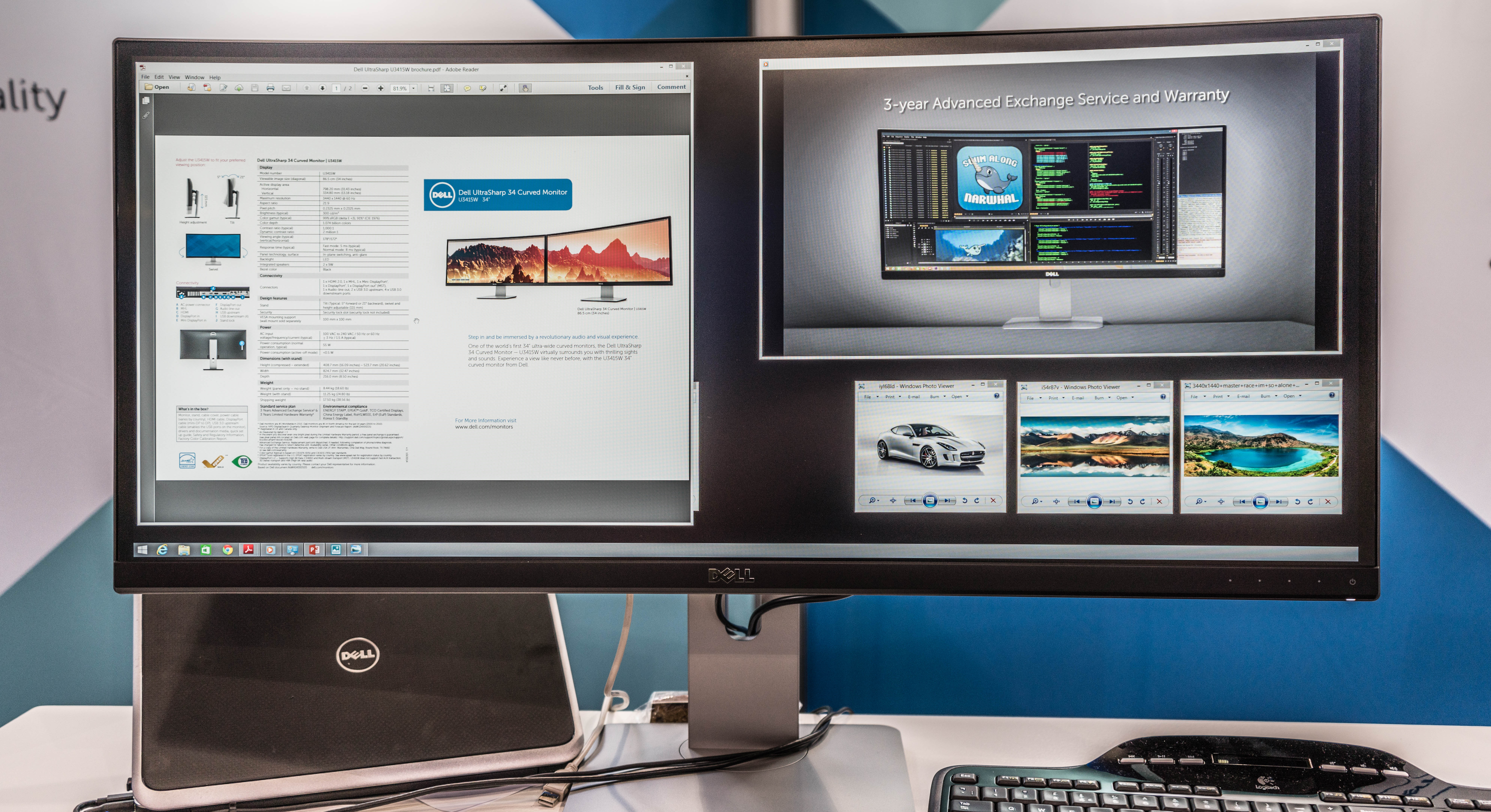
Images from a Dell event confirm the U3415W’s standard stand design, which appears stable and functional; however, manufacturer documentation does not provide details on stand adjustability such as tilt, height, swivel, or pivot options. Shoppers should consider their workspace and ergonomic preferences accordingly. Accessories such as cables and the contents of the retail packaging are not explicitly documented, so buyers should inquire about included items prior to purchase. Source: https://www.desertcart.in/products/12168321-dell-ultrasharp-u3415w-34-inch-qhd-ultra-wide-1440p-curved.
Pricing, current stock levels, and regional availability are not provided or confirmed within the available sources, which limits direct purchasing guidance. Potential buyers might look up the ASIN B00PXYRMPE on large online marketplaces for pricing trends but should verify compatibility and authenticity. Source: https://www.desertcart.in/products/12168321-dell-ultrasharp-u3415w-34-inch-qhd-ultra-wide-1440p-curved.
Several gaps remain in publicly accessible product details: there is no confirmation about HDR support or advanced color capabilities, which could be relevant for professional photo or video work. The refresh rate is limited to 60 Hz with no indication of higher refresh options. User testing data, reliability reports, or third-party reviews are not included in the documentation, limiting evaluation scope. Additionally, there is no detail on bundled software or warranty terms. Buyers should consider these unknowns and seek further information as needed. Source: https://dl.dell.com/manuals/all-products/esuprt_display_projector/esuprt_display/dell-u3415w-monitor_user%27s%20guide_en-us.pdf.
In summary, the Dell UltraSharp U3415W offers a large curved IPS display with a high resolution and versatile connectivity options including USB 3.0 hub functionality. Its features suit users aiming for a broad workspace with standard 60 Hz refresh performance. However, the absence of information on HDR, refresh rates beyond 60 Hz, bundled accessories, and current market availability indicates prospective buyers should carefully investigate their specific requirements and confirm product details before purchasing. Source URLs are included for detailed reference.
Sources & further reading
- Manufacturer exact-model facts
- Primary retailer exact ASIN and part identity; pricing and stock excluded
- Authentic exact-product work and commercial license evidence
- Authentic exact-product work and commercial license evidence
- Manufacturer exact-model reference on registered manufacturer host
Original planning analysis based on the cited specifications. We do not claim hands-on testing. Confirm manufacturer compatibility and follow the supplied instructions.